Unlock Greater Printing Complexity with Non-Planar Printing
DNA Forma Lab transforms non-planar bioprinting from a highly manual, expert-driven, process into a guided workflow. Designed for the BIO X series, the software helps researchers move from geometry to validated, print-ready G-code.
While alternative approaches often rely on specialized robotic systems or custom development workflows, DNA Forma Lab brings non-planar path generation into an accessible software environment designed for BIO X series users.
Generate, refine, and validate advanced toolpaths without developing custom scripts or moving between multiple software tools.
Expanded design freedom
Create curved or branched structures with greater control.
Print with Confidence
Validate toolpaths and identify issues before they cost time and material.
EASY G-Code HANDLING
Generate advanced toolpaths with no coding, and edit visually in the built-in G-code Editor.
Accelerate Development
Iterate, refine, and validate print paths in a unified workflow.
Layer-by-layer printing
Conventional printing has limits
Conventional bioprinting builds constructs in stacked horizontal layers. While suitable for many applications, this approach can make it difficult to reproduce smooth, curved anatomical surfaces and branched geometries.
Non-planar printing
Moving beyond flat layers
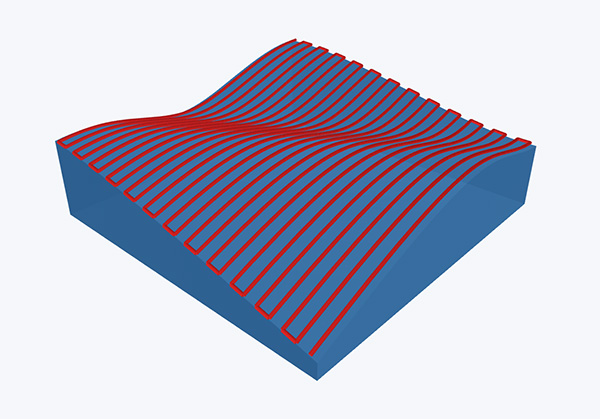
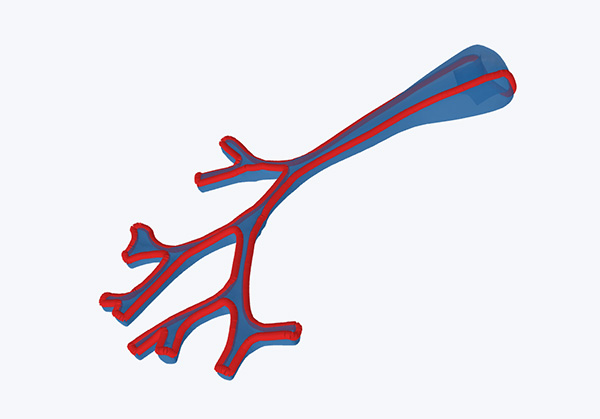
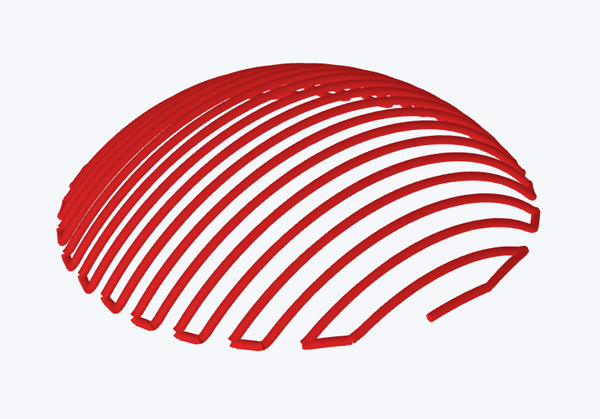
DNA Forma Lab generates geometry-aware toolpaths that follow the contours of your model, resulting in 3D constructs that better reflect the shape and continuity of native tissues.
Surface-following Structures
Branched and Vascular Geometries
Curved anatomical surfaces
Create, refine, and validate
Unique Features
Non-Planar Slicing
Generate non-planar G-code directly from STL or OBJ meshes, point clouds from a scanner, or an existing G-code file.
The slicer detects branches and curved sections, ensuring material is deposited along targeted geometries instead of only flat layers.
Collision Detection
Identify and resolve potential toolpath conflicts before printing. Every move where the tip would hit previously printed material is flagged. These collisions can then be adjusted right away.
This is especially important for non-planar workflows where toolpaths may move below previously printed regions of the construct.
Tip Profiles
Simulate your print with the nozzle tips or needles you intend to use, with tip clearance and minimum overlap settings.
Delete and Bridge
Remove and adjust the colliding paths automatically with the Delete and Bridge feature, or move them manually with the Visual G-code Editor.
Visual G-code Editor
The visual G-code Editor ensures you can continue adjusting the toolpath after initial slicing. Select, move, add or remove individual or multiple segments of the toolpath directly in the interactive 3D viewer – no G-code experience needed.
This resolves problems that no slicer setting can express, such as rerouting paths away from delicate printed materials.
Print Simulation
Simulate the entire print with from start-to-finish before exporting the G-code, at real feedrates or a chosen speed multiple.
Line thickness can follow the extrusion volume, so over- and under-extrusion can be seen, as well as other potential issues before you print.
Designed for Advanced Bioprinting Applications
DNA Forma Lab supports the creation of constructs for a range of advanced bioprinting applications such as wound healing models, vascular tissue models, and corneal tissue engineering, where reproducing complex three-dimensional geometries may be important to the biological design.
Generate and validate toolpaths for embedded bioprinting within support baths or for printing directly onto curved and non-planar substrates, helping you reproduce complex geometries with greater control and confidence.
Tech Note: Using DNA Forma Lab for Over-Surface and Embedded Bioprinting Workflows
In this tech note, we showcase how DNA Forma Lab enables the creation of both surface-following and branched bioprinted structures on the BIO X series.
Through two example workflows, over-surface and embedded, we demonstrate how geometry-aware toolpaths can support more complex and anatomically relevant designs. In the cell-based over-surface nose workflow, we demonstrate a cell viability above 90% through 7 days of culture.
DNA Forma Lab is compatible with BIO X Gen 2, BIO X Gen 3, and all BIO X6 systems. Reach out to our team to determine your comparability or for upgrade options.
Bring Advanced Non-Planar Bioprinting to Your Workflow
Generate more complex geometries, reduce manual workflow steps, and gain greater confidence in every print.